Was this helpful?
Poor sound quality from product | Bose QuietComfort Headphones
Determine if the problem is specifically related to bass performance.
If there is too little bass, see Too little bass or too much treble from product.
If there is too much bass, see Too much bass or too little treble from product.
Do you hear static or distorted audio while in noisy environments?
If the audio is distorted while in loud environments such as construction zones or during take off on an airplane, see Crackling sound heard in noisy environments.
Check the equalizer settings in the Bose app.
Be sure the bass and treble adjustments are not set too high or too low for your preferences. For more info, see Using the Equalizer settings.
Reset your product.
Much like rebooting a smartphone, your product might need to be reset on occasion to correct minor issues. For more information, see Resetting your product.
Try a different app.
If the issue only occurs with a particular app, it is likely related to the app or app settings.
Reboot the Bluetooth® device.
Electronics, such as cell phones, tablets or computers, might need to be reset on occasion to correct minor issues. This is typically done by shutting down the device, then powering it on again.
Check the EQ settings on your Bluetooth® device.
The EQ settings of your Bluetooth device can affect sound. On the device, try setting the EQ to "off" or "flat" and disabling any other sound playback adjustments (i.e. loudness, compression, reverb, etc.). These settings are commonly found in the device's audio settings or in the settings of the app being used to play audio.
If connecting to a Windows computer via Bluetooth®, be sure the Stereo audio profile is selected.
On your Windows computer, click the speaker icon In the lower-right to view the volume slider. Click the ^ above the volume slider to view a list of available audio devices. (Tip: If your Bluetooth product is not connected, the ^ may not appear.) Your product will appear twice: once with Stereo or A2DP next to it and once with Hands-Free or HSP next to it. For full-range audio quality, select the Stereo listing.
Try connecting a different audio device.
If available, connect another audio device using the same cables and connections to determine if the issue is related to the first device or its settings.
If connected, bypass any adapters or extension cables.
If your product connects to the device using an extension cable or adapter, disconnect the extension cable or adapter to determine if the issue is related to it.
Be sure your product is within 33 feet (10 meters) of the Bluetooth device.
This range can be reduced by obstacles (e.g. walls, doors, appliances, wireless devices, etc.). Try moving the device and product closer together.
Check the condition of the headphone cable.
If the plug or any part of the cable is damaged, replace the headphone cable.
Unplug and reconnect the audio cable in the connected device.
On the connected device, disconnect the cable that connects your headset. Then, reconnect it to be sure it is fully connected and secure. (Tip: While connected, if you rotate the plug in the jack and hear crackling or intermittent sound, there might be debris or an issue with a contact inside the jack.)
Plug in a different pair of headphones.
Connect another pair of headphones to the audio device to determine if the issue is with the device or its settings.
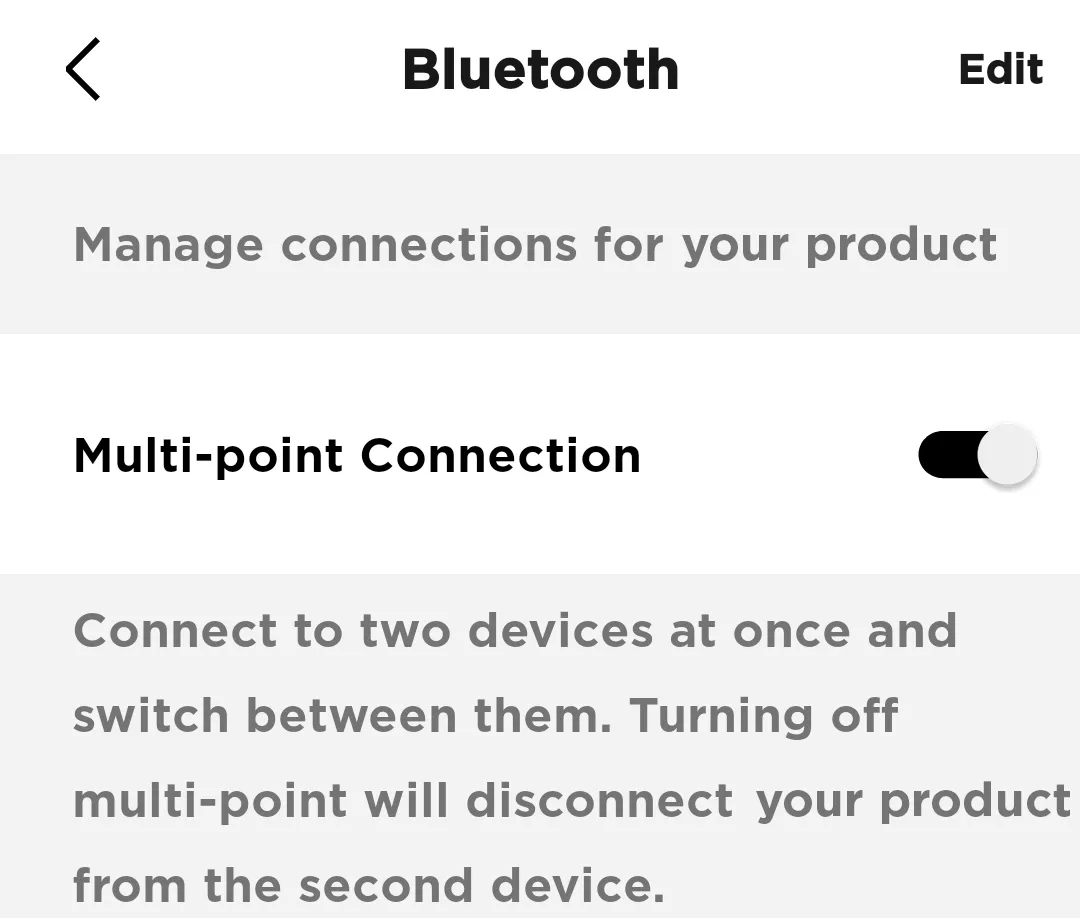
Try disabling the Multi-point connection in the app
If you find that notifications from your secondary device interrupt your listening experience on your primary device, you can turn off Multi-point.
In the Bose app, go to Settings>Bluetooth Connections and toggle Multi-point connection to 'off'. This will disconnect your secondary device.

Note: You will only be able to connect to one device at a time. If you want to connect to two devices simultaneously, toggle Multi-point connection back to 'on'
In the Bose app, go to Settings>Bluetooth Connections and toggle Multi-point connection to 'off'. This will disconnect your secondary device.
Note: You will only be able to connect to one device at a time. If you want to connect to two devices simultaneously, toggle Multi-point connection back to 'on'