Was this helpful?


Description: No power
Description: When power is first supplied before the system boots, the hardware will put the LEDs into this state
Description: Immediately after startup. If the LEDs remain in this mode, there is a problem with the Power On Self Test (POST): either the FLASH did not checksum or the SDRAM memory test failed
Description: Board is powered, initialized, Audio Input Cable disconnected
Description: Board is powered, initialized, media center turned off
Description: Board is powered, initialized, has been turned on by the media center and S/PDIF is present
Description: Board is powered, initialized, has been turned on by the media center (or in ASCII TAP mode), S/PDIF not present
Description: The green LED flashes whenever a byte is received from the media center. This flashing modulates the current state of the green LED, so the normal 1 Hz rate may be interrupted by incoming data
Description: If the board passed the POST and generally seemed to be OK, this state indicates that a catastrophic software error has occurred
Description: Indicates major hardware or software problems
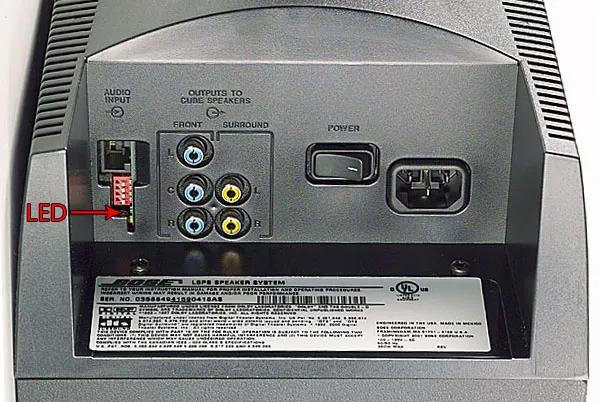
Note: If the bass module dip switches are not set properly, alternate blink patterns can occur.
.png)


