Was this article helpful?
Power Issues | Bose QuietComfort Ultra Earbuds (2nd Gen)
Make sure your earbuds fit correctly in the charging case
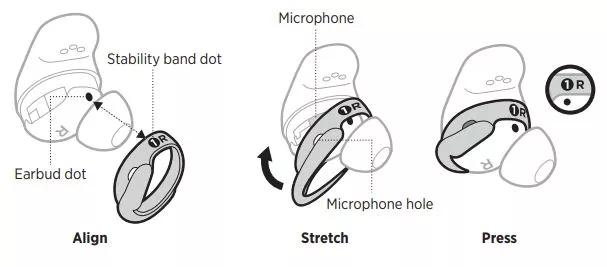
- Check the stability bands on your earbuds.
If the band is not lined up correctly, the earbuds will not sit properly in the case. This is the most common reason why earbuds do not charge.- Check the alignment: Make sure the numbered dot on the stability band lines up with the dot on the bottom of the earbud.
- Listen for the magnetic snap: When aligned correctly, the earbud should "snap" securely into place in the charging case. You'll also see an LED light inside the case lid turn on.
- Try without the stability band: If the earbud still isn't charging, remove the stability band and place the earbud directly in the case. This will help determine if the band is the issue.
See this video for more details. - Direct Link:
- Look for damage to the charging case.
Pay attention to the small charging pins inside the case. If the pins or any part of the case is damaged, click here to order a new case.. - Always close the case lid.
This preserves the charging case’s battery and powers off the earbuds when stored, helping conserve their battery life.
Check the case is charging properly
Charging Case Status Light
- Amber (pulsing): Case is charging
- White (solid): Case is fully charged
If the light does not appear, follow these steps:
Cable & Adapter Checks
- Verify the USB cable is correctly aligned with the case port.
- Secure both ends of the cable.
- Test with another USB‑C cable.
- Try a different wall charger or power adapter.
- Ensure case accessories don’t block the cable connection.
Wireless Charging
- Use a compatible third‑party wireless charger (not included).
- Align the button on the back of the case with the center of the charger.
- Confirm the wireless connection is established.
Cleanliness and Environmental Factors
Environmental Conditions
- If exposed to extreme hot or cold, let the earbuds & case return to room temperature before charging.
Contacts & Cleanliness
- Inspect earbuds and case charging pins for dirt or debris.
- Clean gently as described below if needed to ensure proper contact.
| Component | Procedure | Caution/Notes |
|---|---|---|
| Charging contacts (earbuds) | Wipe contacts with a dry, soft cotton swab to prevent corrosion. | Note: Keep contacts clean and dry. |
| Charging case | Wipe only with a dry, soft cotton swab. | Note: Do not use liquids on the case. |
Make sure the earbuds are not in standby mode
Standby conserves the earbud battery when the earbuds are out of the case and not in use. The earbuds switch to standby when you remove both earbuds from your ears for 20 minutes. To wake the earbuds, insert both earbuds in your ears or use the Bose app.
Reset your earbuds:
Resetting the earbuds and charging case resets the product controls and reboots the earbuds and case. It doesn’t clear any device settings. If your earbuds or case aren't responding, follow these steps to reset them:
- Put the earbuds in the case so they snap into place. Make sure the lights show they’re charging.
- Close the lid of the case.
- Plug the case into power using a USB-C cable—either to a wall charger or a computer.
- Press and hold the button on the back of the case for about 30 seconds, until the case light turns off.
That’s it—your earbuds and case are now reset!
Your earbuds need to be replaced.
If the steps above did not resolve your issue, your earbuds need to be replaced. Click START A REPAIR OR REPLACEMENT below to begin the process online — the fastest and easiest way to get service.