Loading
Connecting a Bluetooth Device | Bose Smart Soundbar
bose-smart-soundbar
Bose Smart SoundbarSold from 2024

Connecting a Bluetooth Device | Bose Smart Soundbar

You can connect a Bluetooth device using the buttons on your product or the Bose app.

Below, we'll show you how to connect using the buttons on your product. For help connecting using the Bose app, see Connecting a Bluetooth device using the Bose app.

Put your speaker in Discoverable mode.

  1. Power on your speaker.
  2. On the remote control, press and hold the Bluetooth button until the light bar on the speaker is blinking blue.

Select your product in the Bluetooth menu of the device.

Smartphone, tablet, or other device

Connect to the device.

  1. On the device you want to connect, be sure its Bluetooth function is turned on
  2. In the Bluetooth list of the device you are connecting, select your Bose product
    If you don't see your Bose product in the list of discovered or available devices, tap Add device, Scan, Refresh, or something similar and then look for the name of your product.
TV

Connect to the TV.

IMPORTANT: If you have trouble, confirm the TV can send sound to a speaker or headphones using Bluetooth®. Some TVs can only receive sound via Bluetooth (e.g. to play sound from a smartphone through the TV speakers) but cannot use Bluetooth to send sound from the TV to a speaker or headphones.

Open the settings menu on the TV. Options vary by TV but, typically, you will need to go to the Audio or Bluetooth settings. For example, you might need to go to Audio settings, select Bluetooth, and then choose your Bose product.
A PC running Windows 11

Connect to Windows 11.

  1. On your computer, select the Start button

  2. Select Settings
  3. In the left pane, select Bluetooth & devices

  4. On the right, be sure the Bluetooth toggle is in the On position
  5. Select Add device

  6. When prompted to select a device type, select Bluetooth. Windows will then search for available Bluetooth devices

  7. Select your Bose product from the list of available devices
    Tip: If your product appears twice, select the one with the headphones or speaker icon next to it. Do not select the one with LE- in the name. If you already did, just start over and select the other option

  8. Click Done.

A PC running Windows 10

Connect to Windows 10.

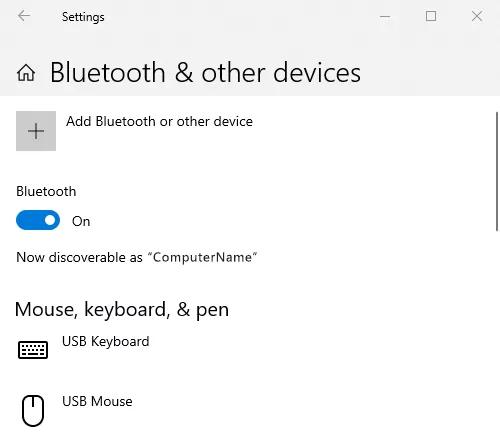
  1. On your computer, go to the Bluetooth® settings
    Tip: To get there, you can click the Windows button in the lower-left, begin typing Bluetooth, then select Bluetooth and other device settings

  2. If Bluetooth is off, switch the toggle to On

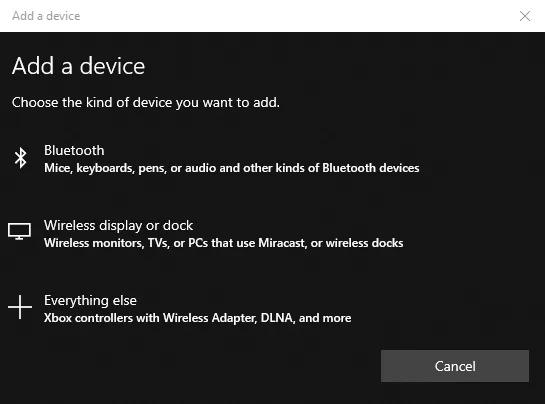
  3. Select Add Bluetooth or other device

  4. Select Bluetooth

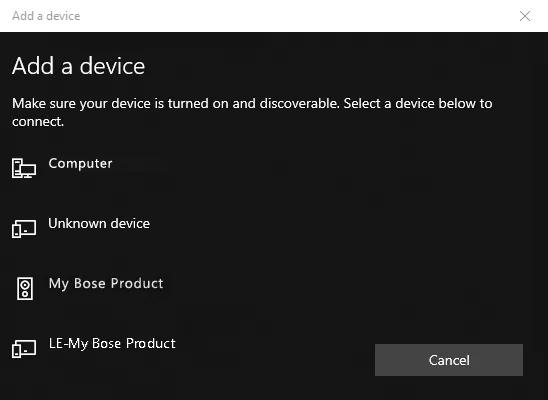
  5. Select your Bose product from the list of available devices
    Tip: If your product appears twice, select the one with the headphones or speaker icon next to it. Do not select the one with LE- in the name. If you already did, just start over and select the other option

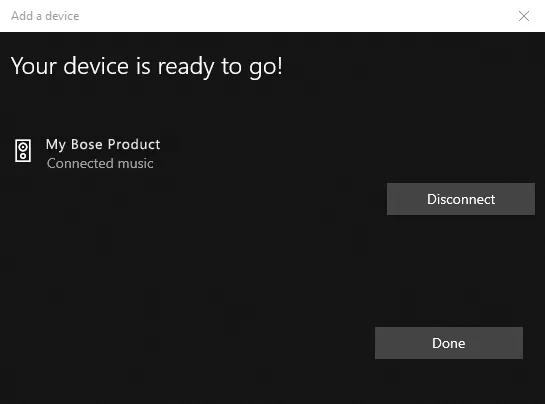
  6. Click Done.

macOS computer

Connect to macOS 10.9.2 or newer.

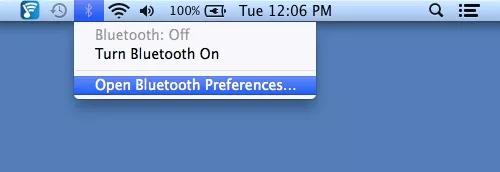
  1. From your desktop, click the Bluetooth® icon in the menu bar in the upper-right

  2. Click Open Bluetooth Preferences…

    macOS dropdown menu with Bluetooth Preferences

  3. If Bluetooth shows it is off, click Turn Bluetooth On

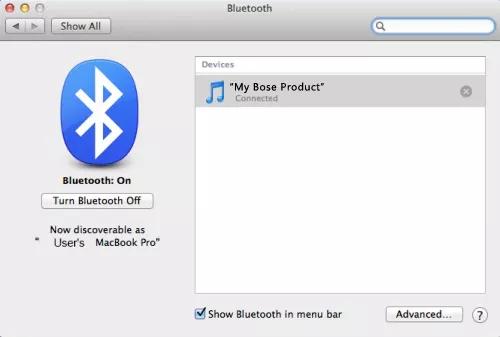
  4. From the list of available Bluetooth devices on the right, click Pair next to your Bose product and wait for the computer to confirm it's connected.
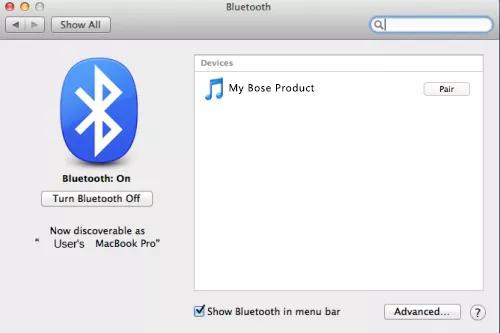
    macOS screen to pair Bluetooth devices macOS screen showing connected Bluetooth devices

Chromebook

Connect to Chrome OS.

  1. On the computer, select the clock in the lower-right of the screen
  2. Select Bluetooth
  3. If Bluetooth is off, turn it on
  4. Select your Bose product from the list available Bluetooth devices. Once connected, your product will be listed under Paired devices.

Check that your speaker is connected.

When your speaker connects to a Bluetooth device, a tone is played - indicating a successful connection - and the light bar on the front of the speaker glows white.

If you are unable to connect a Bluetooth device

See troubleshooting for Cannot connect a Bluetooth device.
Loading
Connecting a Bluetooth Device | Bose Smart Soundbar