Was this article helpful?
Setting up your product | Bose TV Speaker
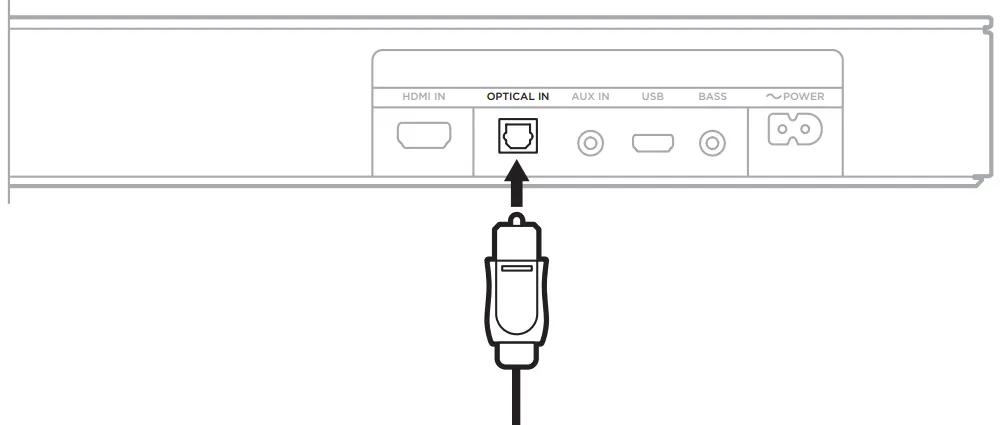
Connect the speaker to your TV using the optical cable.
- Using the optical cable provided with the speaker, remove the protective cap from both ends of the cable.
- Align the plug with your TV's Optical Out port and insert it carefully.
- Align the plug at the other end of the cable with the speaker's Optical In port and insert it carefully until you hear or feel it click into place.
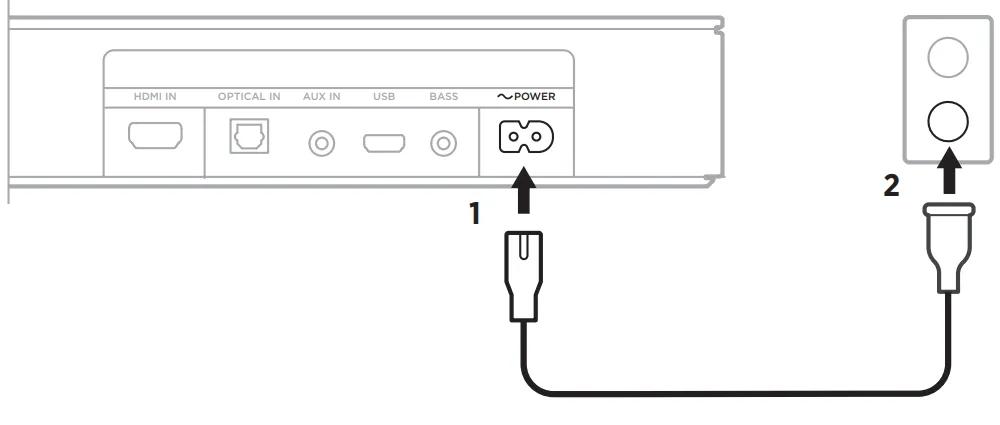
Connect the speaker to power.
- Connect the power cord to the Power port on the back of the speaker.
- Connect the other end of the power cord to an AC power outlet.
The speaker will power on and play a tone.
Turn off your TV speakers.
Using the remote control of your TV, access its Settings menu. Navigate the menu and locate the option regarding the TV's speakers. Disable the TV speakers and/or enable the optical output so that sound will only play through the Bose speaker. For more information, refer to the owner's guide of your TV.
Frequently Asked Questions
Can I use HDMI?
HDMI can be used if the HDMI port on the TV is labeled as "ARC" or "eARC".
- When connecting the Bose TV Speaker to your TV using an HDMI cable (not included), the speaker must be connected to an HDMI port on the TV that is labeled as "HDMI ARC" or "HDMI eARC". The HDMI port must support Audio Return Channel (ARC) functionality so the TV can send its sound to the Bose TV Speaker. Many TVs include ARC or eARC functionality on one HDMI port; Older TVs have HDMI connections without this capability at all.
- If connected to a TV using an HDMI cable, the remote control of the TV or another HDMI-connected device may control the on/off and volume functions of the Bose TV Speaker provided the HDMI-CEC setting on the TV and other HDMI-connected devices is enabled. For more information on the HDMI-CEC setting, refer to the owner's guide of your TV and connected device(s). TV manufacturers may refer to HDMI-CEC functionality by a brand-specific name, and it may be enabled by default.
- A video on setting up the Bose TV Speaker is available on our Bose Product Support YouTube channel.
Does the TV Speaker support Bluetooth?
Yes, the Bose TV Speaker can receive Bluetooth audio.
The Bose TV Speaker can receive wireless audio from a source device such as a phone, tablet, or computer that can send audio using Bluetooth functionality. The Bose TV Speaker has Bluetooth version 4.2. For more information, see Connecting a Bluetooth device. We do not recommend connecting the speaker to your TV using Bluetooth functionality.
Can I connect a subwoofer to the TV Speaker?
Yes, an optional Bose Bass Module 500 or Bose Bass Module 700 can be connected.
An optional Bose Bass Module 500 or Bose Bass Module 700 can be connected to the Bose TV Speaker using a wired connection. A stereo audio cable with 3.5 mm connectors at both ends is required; Sold separately as the Bose Bass Module Connection Cable. For set up information, see Connecting the bass module. Subwoofers or bass modules from other Bose systems—including non‑Bose models—are not compatible with the Bose TV Speaker, except for the Acoustimass 300 bass module.
Why do I not hear any sound from my TV Speaker?
Check the troubleshooting guide for no sound.
For steps on resolving this issue, see the No audio from product troubleshooting article for the Bose TV Speaker.