Was this helpful?


To get the latest update, make sure your earbuds are connected to your phone or tablet through the Bose app. Your earbuds cannot be updated without being connected to the Bose app.
The update might take up to 45 minutes, but it usually finishes much faster.
You can keep using your earbuds during the update. If you stop using them, the update will pause and pick up where it left off the next time you use them.
When a new update is ready, it will be sent to the Bose app automatically.
You’ll see a “Transferring Update” message over your product image in the app. Once the transfer is done, the message will change to “Install Update.”
Tap it to start, then tap “Update Now” on the next screen. The app will guide you through the rest of the steps.
When the update finishes, reconnect your earbuds to your phone or tablet. Open the Bose app again to make sure the update was installed successfully.
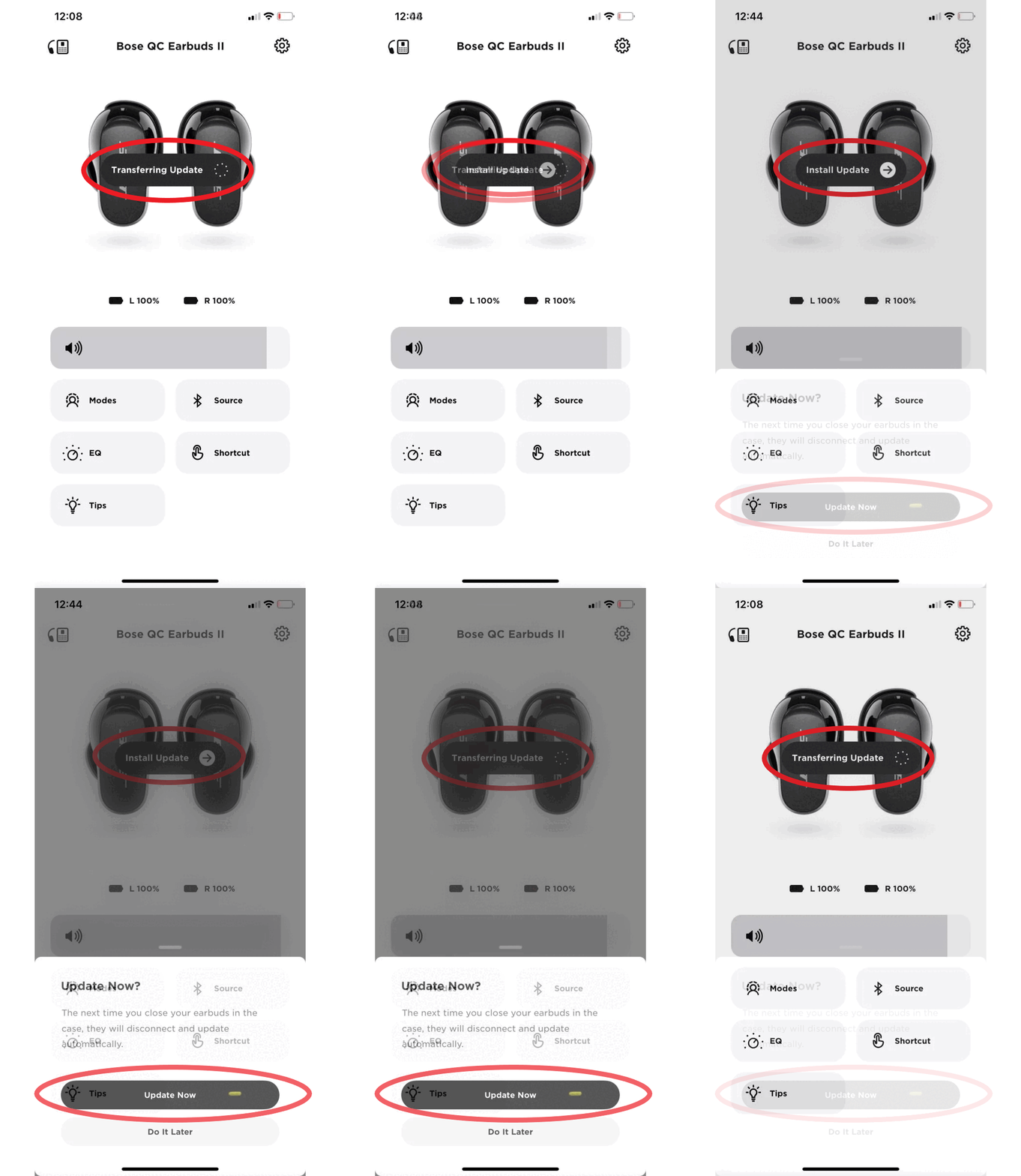
Note: Product images may vary but the process remains the same.
The information in this video applies to Bose QuietComfort Earbuds II, QuietComfort Ultra, and QuietComfort Ultra (2nd Gen) products. Please note the Bose Music app is now called the Bose app.
Release Date | Version | Release Notes |
|---|---|---|
16 February 2023 | Earbuds 1.3.26 |
|
13 September 2022 | Earbuds 1.1.14 |
|
Initial Release | Earbuds 1.0.8 |
The charging case cannot be updated from the Bose app. The changing case can only be updated using the online Bose Updater. This will require connecting the charging case to a computer with a USB connection.
To perform a charging case update:
We recommend keeping your earbuds updated with the latest firmware to ensure optimal performance and access to the newest features. Firmware updates can resolve minor bugs, improve device compatibility, and provide a more consistent listening experience.
If you're experiencing issues with your QuietComfort Earbuds II, click here to review our troubleshooting guide.
If you've already tried all troubleshooting steps and the issue persists, click here for the quickest way to request service for your earbuds.
.png)


