Was this helpful?


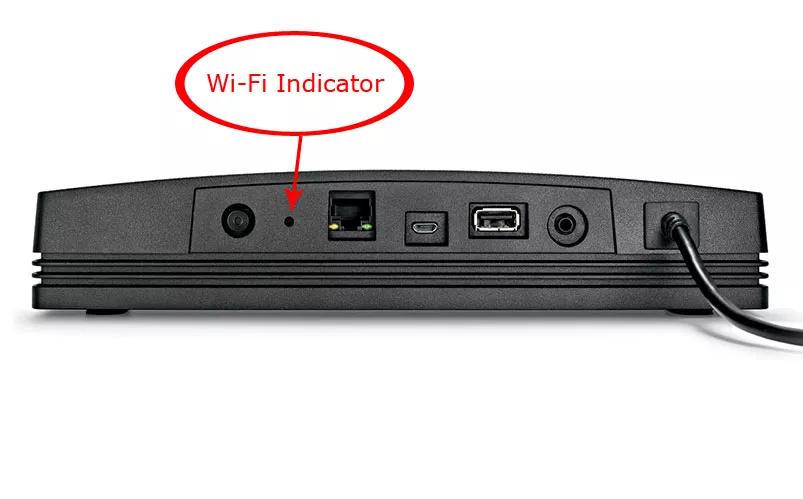

LED State: Off
Description: The adapter is unpowered, connected via Ethernet or the network is disabled

LED State: White (blinking fast)
Description: The adapter is attempting to connect to a Wi-Fi network

LED State: White (slow flash)
Description: The adapter is downloading a firmware update

LED State: White
Description: The adapter is connected to a Wi-Fi network

LED State: White (solid 3 sec, double-flash, repeat)
Description: The adapter is installing a firmware update

LED State: Amber (blinking)
Description: The adapter failed to connect to Wi-Fi / network error

LED State: Amber (blinking fast)
Description: The adapter has a firmware error

LED State: Amber (solid)
Description: The adapter is in setup mode broadcasting its "Bose SoundTouch Wi-Fi Network"
| Console LED | Monitor LED | Description | Related Information |
|---|---|---|---|
| Off | Off | No Power or system is off (Standby) | |
| Red | Red | System is in network standby | |
| Blinking Green* | Blinking Green* | System is starting up -or- System Information Screen is up | Product will not turn on System continuously reboots |
| Green | Off | System is on | |
| Blinking Red (5 on, 1 off)** | Red | Remote batteries are low | |
| Blinking Amber (5 on, 1 off)** | Red | Unify has not completed | Connecting other devices to your system |
| Blinking Amber (5 on, 1 off) | Red | System is off and device has been removed from the console | |
| Red | Alternating Green/Red | Thermal shutdown has occurred*** | |
| Blinking Green or Solid Green | Blinking Red | No Power to AV Monitor | |
| Green | Green | Video Mute enabled | Adjusting Video Mute |
| Amber | Red | System powering down -or- System off and charging iPod | The LED will be amber for about 15 seconds while the system powers down |
| Blinking Red (5 on, 1 off) | Red | Unify process complete but no available devices connected | |
| Green | Red | A/V monitor cable needs reseating or control console requires update | Updating the software or firmware of your product |
.png)


