Loading
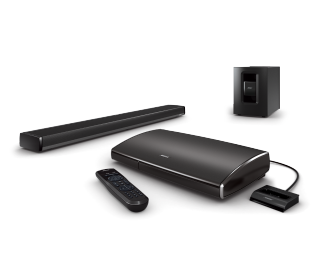
Expansion remote does not work | Lifestyle® 135 home entertainment system
lifestyle®-135-home-entertainment-system
Lifestyle 135Sold from 2011 - 2013

Expansion remote does not work | Lifestyle® 135 home entertainment system

Be sure the antenna for the expansion remote control is not damaged and has been connected.

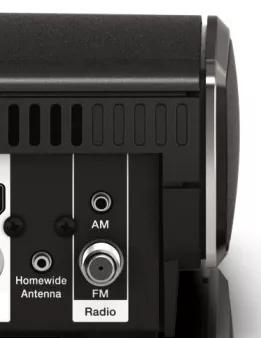
In order for the system to receive commands from an expansion remote, the antenna supplied with the expansion remote must be connected to the Homewide Antenna jack on the rear panel of the control console.

Before connecting the antenna, visually inspect the cable and the connector. If the cable or connector shows any sign of damage, replace the antenna. After ensuring the antenna is connected to the Homewide Antenna, extend the 10-foot (3-meter) antenna portion of the 30-foot (9-meter) cable away from other cords and cables—specifically power cords as they can create interference which reduces remote performance.
Homewide Antenna jack

Expansion rooms cannot be turned on while the main room is powering up.

When the main room is turning on, the system will not process any commands from an expansion remote. Avoid attempting to turn on both the main room and an expansion room at the same time, otherwise the power or a source selection button on the expansion remote will need to be pressed again after the main room has turned on

If the expansion remote is a PMCIII, be sure the console software version is 01.07.00 or greater.

Advise the customer to update the system software if it is not 01.07.00 or greater.

For instructions on checking software, see Checking the software or firmware version
For software info, see Software and firmware versions

Be sure the expansion remote house code is set properly.

The House Code setting within the Setup menu of the main room control console must match the expansion room remote control, otherwise the system will not process the commands of the expansion remote. For more information, see Associating the expansion remote with the system.

Determine if the control console responds to the expansion remote.

With the system on (steady green LED - start up complete), press any button on the expansion remote while looking at the front of the control console. The LED should turn off whenever a button on the remote is pressed. If the LED blinks in response to each button press, the expansion remote is working. Verify the connections and settings of the expansion product(s) setup.

Make sure the proper expansion remote is being used.

A remote designed to operate another system will have partial or no functionality when used with the wrong system. Verify that the model number on the back of the remote is compatible. For information on Compatible Bose Expansion Remotes, see Specifications for the media center

Make sure the proper variant of the remote is being used.

A remote designed to operate a system sold in another region will have no functionality. The model number on the back of the remote (or within the battery compartment) must end in -27 to operate a media center made in North America or -40 to operate a media center made outside North America. These numbers refer to the frequency (in megahertz) at which the remote communicates to the media console.

Try new batteries in the remote.

In case the battery or batteries in your remote are low or have no power, replace them. Alkaline batteries are recommended over rechargeable batteries, which might output lower voltage. (Note: Battery testers are not always reliable since they might detect power but not indicate if there is adequate power for the remote.)

The Control Console may need service.

If the steps provided do not resolve your issue, the Control Console may need service. Follow the link below for more information on how to service the Control Console. Depending on your product and region, you will be provided a contact number or the ability to setup service online.

Click here to start service

Was this article helpful?

YES
NO
START A REPAIR OR REPLACEMENT
Loading
Expansion remote does not work | Lifestyle® 135 home entertainment system